Sovereignty in action: a DCM demo
It is 2 a.m. when your on-call team gets an alert that a Region A datacenter is down. The application holding customer data is unreachable, customers are waiting, and someone in leadership is already asking for an ETA. The engineer on duty opens the agent list and finds a healthy datacenter in Region B at the top. If you are only looking at infrastructure health, that is where you would send the workload next.
The workload was never supposed to leave Region A. Whether the constraint comes from GDPR, a data residency requirement, a customer contract, or an internal policy, the rule is the same: data that lives in Region A does not belong in Region B. Crossing that line during an outage is not a shortcut back to green. It is the start of a compliance incident that can outlast the outage itself, with audit work, legal review, and lost trust trailing behind it.
That is a hard call to make when everything is on fire. The healthy region is staring you in the face. The compliant option is harder to find and easier to second-guess. In most organizations, someone has to remember the rule out loud, defend it, and hope nobody reaches for the faster path while the minutes tick by.
The demo below walks through how DCM takes that call out of the incident. You write the regional boundary into policy once and deploy with that intent. When something breaks, rehydration replays the original request and lets the policy engine choose the next home. Region B can stay healthy and first on the list. The application still stays in Region A.
The lab setup
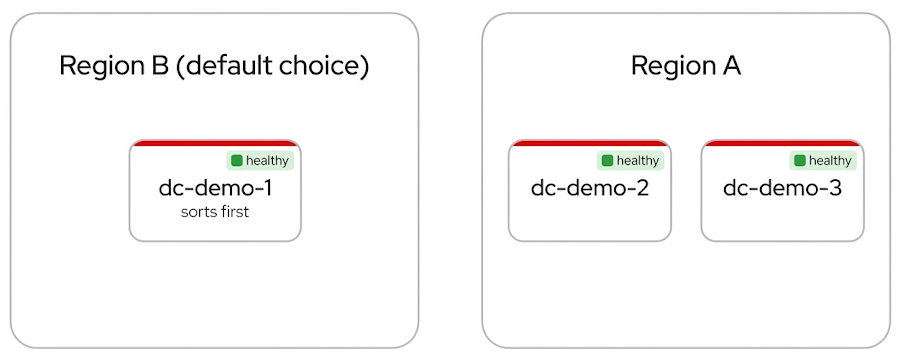
We run the scenario on three datacenters split across two regions:
| Region | Datacenters | Notes |
|---|---|---|
| Region A | dc-demo-2, dc-demo-3 | Where the app is allowed to live |
| Region B | dc-demo-1 | Healthy, but off limits for this workload |
All three start healthy. Here is the twist: Region B sorts first. If DCM only picked the first available agent, every new deployment would land there by default. That is exactly the trap the sovereignty policy is meant to prevent.
One policy, enforced everywhere
The regional rule is a
Rego policy you
create once in the DCM UI under Policies → Create. Name it
Sovereignty Region Policy, set type to GLOBAL, priority to 1, and paste
the policy below.
You do not need to read every line to follow the demo. Here is the logic in plain English:
No region, no deploy
If the request does not specify a target region, the policy rejects it. Sovereignty is mandatory from day one, not something you bolt on after an audit finding.
Only healthy agents in the right region
The policy asks the agent registry what is available, then filters the list.
Agents in the wrong region drop out, even if they are healthy. Agents in the
right region must also be ready. Region B never makes the shortlist for a
Region A workload.
First match wins (within the region)
Among the survivors, the policy picks the first agent alphabetically. That is
why the initial deploy lands on dc-demo-2, and why failover moves to
dc-demo-3 when dc-demo-2 fails.
What if an entire region goes down?
If no healthy agent exists in the requested region, the request is rejected with a clear error. DCM will not silently fail over across a regional boundary to “help.” That is the point. A hard failure is easier to explain to a compliance officer than a quiet data residency violation.
Setup note: Each environment agent’s
environmentfield must be set to its region code at registration time (for exampleAGENT_ENVIRONMENT=region-ain the compose.env). This is the value the policy reads to enforce sovereignty placement.
View the full Rego policy
package agent.sovereignty

import rego.v1

agents_url := "http://control-plane:8080/api/v1alpha1/agents"

main := {"rejected": true, "rejection_reason": "spec.service_type is required"} if {
    not input.spec.service_type
}

main := {"rejected": true, "rejection_reason": "spec.metadata.labels.region is required for sovereignty placement"} if {
    input.spec.service_type
    not input.spec.metadata.labels.region
}

main := result if {
    service_type := replace(input.spec.service_type, "-", "_")
    requested_region := input.spec.metadata.labels.region

    response := http.send({
        "method": "GET",
        "url": agents_url,
        "headers": {"Accept": "application/json"},
    })

    agents := response.body.agents

    region_agents := [a |
        some a in agents
        a.health_status == "ready"
        service_type in a.service_types
        a.environment == requested_region
    ]

    result := _agents_result(region_agents, service_type, requested_region)
}

_agents_result(agents, service_type, region) := {"rejected": true, "rejection_reason": msg} if {
    count(agents) == 0
    msg := sprintf("no ready agents in environment '%s' for service type '%s'", [region, service_type])
}

_agents_result(agents, _, _) := {"rejected": false, "selected_agent": agent} if {
    count(agents) > 0
    sorted_names := sort([a.name | some a in agents])
    agent := sorted_names[0]
}
The demo, step by step
1. Deploy to Region A
Create a Pet Clinic instance from the Instances tab and choose Region
A. DCM evaluates the sovereignty policy, skips Region B, and places the app on
dc-demo-2.
Behind the scenes, DCM stores your original request. That stored intent is the source of truth for everything that follows.
2. Simulate the outage
Take dc-demo-2 offline (podman stop on the agent containers). Region B is
still healthy and still first on the list. In a typical setup, that is where the
story ends and the compliance review begins.
Here, the policy has already ruled Region B out.
3. Rehydrate
Rehydration replays the stored intent against current provider health and policy. In the DCM UI, open Instances, find your Pet Clinic instance, and click Rehydrate (the circular arrows in the actions column). You can also run it from the CLI:
dcm catalog instance rehydrate <instance-uid>DCM provisions a fresh resource on dc-demo-3. Same application identity. New
underlying infrastructure. Still inside Region A.
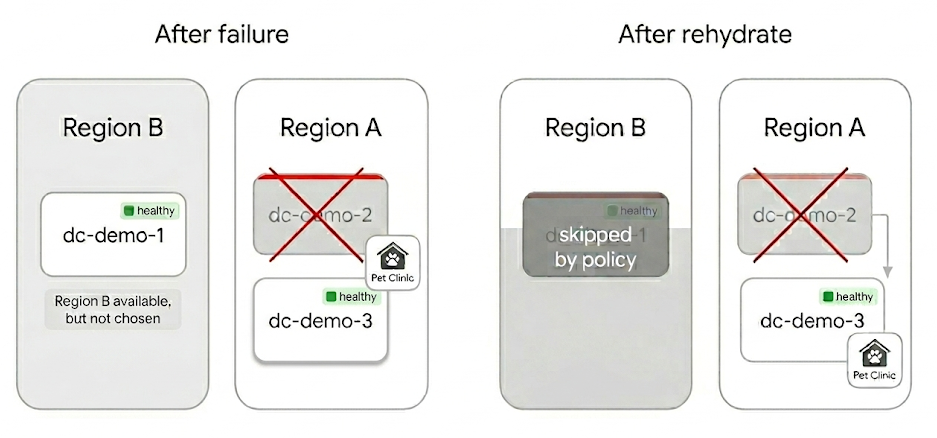
The app moved datacenters, not regions. Nobody edited a routing table. Nobody made a judgment call about whether compliance could wait until morning.
Why this architecture is different
Most platforms draw a hard line between day-one placement and disaster recovery. Different workflows, different runbooks, different approval paths. DCM treats them as the same operation:
| Scenario | What you do | What DCM does |
|---|---|---|
| First deploy | Create a catalog instance | Evaluates policy, places the app |
| Datacenter failure | Rehydrate | Re-evaluates the same policy against current health |
| Planned migration | Rehydrate | Same code path, same policy engine |
Initial placement, disaster recovery, and migration share one mechanism. The catalog instance holds your intent. The policy engine applies your rules. Rehydration is replay, not a separate rebuild workflow invented for emergencies.
That consistency is what makes regional sovereignty hold at 2 a.m. the same way it holds on a quiet Tuesday. The rules do not relax because the pager is loud.
See it yourself
The best way to get a feel for the flow is our interactive walkthrough. Click through the DCM UI at your own pace: explore the agents, create the policy, deploy Pet Clinic, and watch where the app lands.
The walkthrough covers almost the entire scenario in the browser, including rehydration from the Instances tab. The step that still needs a terminal today is simulating the datacenter failure. The guide flags that when you reach it.
Want to reproduce the full lab on your own hardware? You will need the
DCM stack,
three workload clusters with region-tagged providers
(see
SP_REGION
for region metadata), and the
Pet Clinic catalog item
configured with a
deployment region field.
If you are new to DCM, start with the walkthrough above and come back to the lab
setup when you are ready to go deeper.